


Playbooks srv-stage
Ce playbook installe et configure un serveur pour les stages découvertes de VdG
Infrastructure
Serveur
- serveur virtuel avec Rocky Linux 9 (minimum)
- hostname configuré (srv-stage)
- adresse IP configurée avec 172.31.10.20 (home) 172.31.10.20 + proxy (vdg)
- git installé et configuré
- tar package installé
- selinux disabled
Réseau
Nom du domaine : stage-ge.org
| Adresse IP | Nom | Description |
|---|---|---|
| 10.10.10.1 | srv-stage | serveur de stage |
| 10.10.10.21 | 10.10.10.30 | wpc01 |
| 10.10.10.40 | server2016 | serveur windows |
| 10.10.10.41 | printer01 | imprimante partagée |
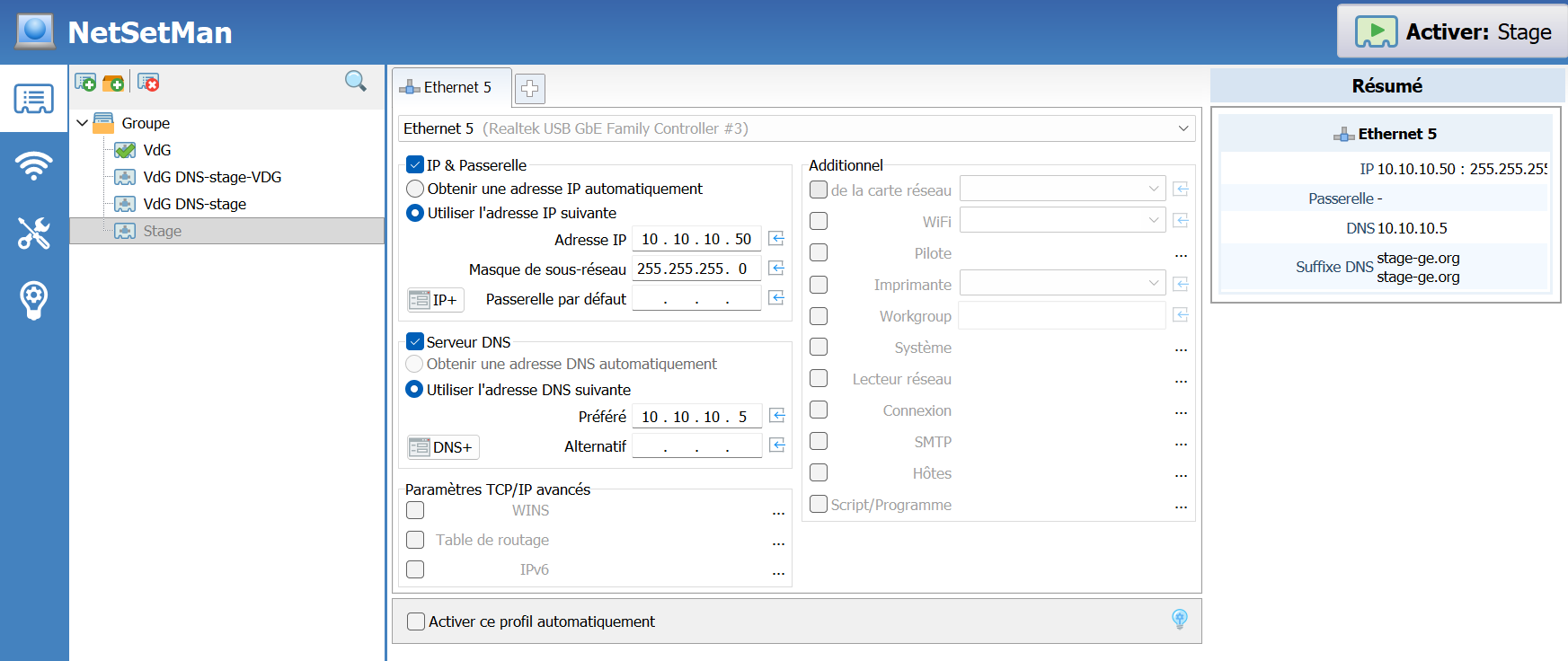
| 10.10.10.50 | vancouver | serveur hôte |
Utilisateurs
| Utilisateur | Nom prénom | Courriel | Mot de passe |
|---|---|---|---|
| stagiaire1 | Stagiaire Uu | stagiaire1@stage-ge.org | password |
| stagiaire2 | Stagiaire Deux | stagiaire2@stage-ge.org | password |
| stagiaire3 | Stagiaire Trois | stagiaire3@stage-ge.org | password |
| stagiaire4 | Stagiaire Quatre | stagiaire4@stage-ge.org | password |
| stagiaire5 | Stagiaire Cinq | stagiaire5@stage-ge.org | password |
| stagiaire6 | Stagiaire Six | stagiaire6@stage-ge.org | password |
| stagiaire7 | Stagiaire Sept | stagiaire7@stage-ge.org | password |
| stagiaire8 | Stagiaire Huit | stagiaire8@stage-ge.org | password |
| stagiaire9 | Stagiaire Neuf | stagiaire9@stage-ge.org | password |
| stagiaire10 | Stagiaire Dix | stagiaire10@stage-ge.org | password |
| mailadmin | Admin Mail | mailadmin@stage-ge.org | Pa55w0rd |
| cyrus | Admin Cyrus | - | Pa55w0rd |
| adminldap | Admin LDAP | - | Pa55w0rd |
| nagiosadmin | Nagios Admin | - | nagiosadmin |
| accessldap | Access LDAP | - | passw0rd |
| root | mysql utilisateur | - | Pa55w0rd |
Services installés et configurés
- un DNS
- des utilisateurs locaux
- un service httpd (apache)
- un service php-fpm (8.2)
- un moteur de DB (mariaDB)
- phpmyadmin
- un service d'annuaire (openldap)
- LDAP Account Manager
- un MTA (postfix)
- saslauthd
- un service IMAP (cyrus)
- un webmail (roundcube)
- un service ftpd (piure-ftpd)
- nagios
- docker
- chat-box programe (via docker)
Scripts
| Nom du script | Type | Description |
|---|---|---|
instsrv.sh |
- | Installe le serveur |
sendWelcomeMail.sh |
Généré par le playbook | Envoie un message de bienvenue dans la boîte des stagiaires |
testSrv.sh |
Généré par le playbook | Test les services du serveur |
stage-ip |
Lien symbolique sur changeIp.sh |
Config réseau stage |
vdg-ip |
Lien symbolique sur changeIp.sh |
Config réseau VdG |
home-ip |
Lien symbolique sur changeIp.sh |
Config réseau maison |
stg1 à stg10 |
Lien symbolique sur muttStage.sh |
Affiche l'inbox du stagiaire |
readAllMailbox.sh |
- | Affiche tous les messages de tous les stagiaires ou d'un stagiaire en particulier (param: 1 à 10) |
Installation
git clone https://gitweb.dyndns.org/scripts/srv-stage.git
cd srv-stage
chmod +x instsrv.sh
./instsrv.sh
Test
Automatique
./stage-ip or ./home-ip or ./vdg-ip
./testSrv.sh
Manuel
LDAP
ldapsearch -H ldap://localhost -x -D "cn=Access LDAP,dc=stage-ge,dc=org" -b "dc=stage-ge,dc=org" CN=* -W LLL
ldapsearch -H ldap://localhost -x -D "cn=Admin LDAP,dc=stage-ge,dc=org" -b "dc=stage-ge,dc=org" CN=* -W LLL
ldapsearch -H ldap://localhost -x -D "cn=Stagiaire Un,ou=People,dc=stage-ge,dc=org" -b "dc=stage-ge,dc=org" CN=* -W -LLL
saslauth
testsaslauthd -u stagiaire1 -p password
0: OK "Success."
cyrusadm
cyradm -u cyrus localhost
lm
chat-box
docker compose -f /home/chat-box/docker-compose.yml up -d
docker exec -it apache_stage /bin/bash
root@chat-box:/var/www# php -q socket.php
http://srv-stage.stage-ge.org:8001

tcpdump
tcpdump port http or port ftp or port smtp or port imap or port pop3 or port telnet -l -A | egrep -i -B5 'pass=|pwd=|log=|login=|user=|username=|pw=|passw=|passwd=|password=|pass:|user:|username:|password:|login:|pass |user '

tcpdump port http -i lo -l -A | grep -i "task=login?&_user=stagiaire2&_pass" --color=auto --line-buffered -B20"
ou
tcpdump -vvvv port 389 -i lo -l -A | grep dc=org
ou
tcpdump -vvvv port 389 -i lo -l -A | egrep -i 'dc=org' --color=auto --line-buffered -B20
ou
tcpdump -vvvv port 389 -i lo -l -A | egrep -i 'Access LDAP' --color=auto --line-buffered -B20
Créer une trace http pour tcpdump
curl --interface 127.0.0.1 "http:/webmail.stage-ge.org?task=login?&_user=stagiaire1&_pass=password"
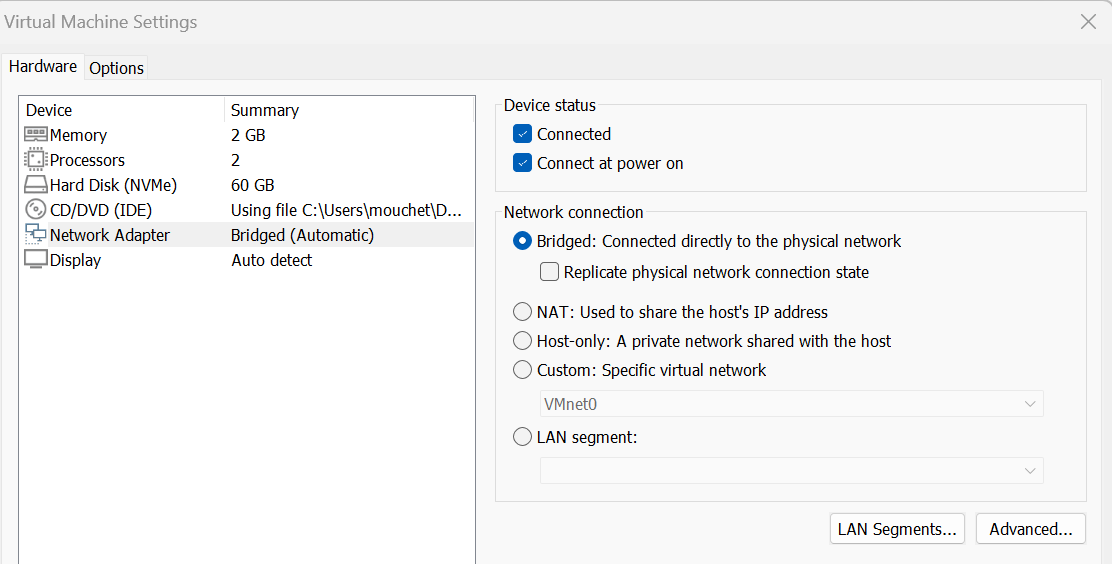
Config VM
Host
Changelog
V2.2 - 2025-01-19
added
- changeIp via ansible
fixed
- DNS config when change ip
- build chat box image for arm64
V2.1 - 2023-12-26
Added
- docker
- chat-box
V2.0 - 2023-01-29
Added
- php82
- nagios
- vsftpd
Updated
- somes scripts files
V1.0 - 2021-12-05
Added
- Initial version by GMo